Optimizing your WordPress website offers several advantages, most of which stem from the ripple effect. If you improve your rankings to the top three positions, you can expect more traffic to your website. When this happens, the business will generate more conversions, sales, and returns on digital investment.
A good SEO guide for WordPress, therefore, must be part of your digital marketing strategy. Without it, the site would struggle to rank and attract convert-ready traffic. The content management system (CMS) platform offers an immense opportunity to improve your performance.
Optimizing your WordPress site can be too technical for someone who just jumped onto the SEO bandwagon. Here’s an exhaustive SEO guide for WordPress to follow.
Before we discussed the main purpose of this guide, let’s discuss why SEO is important. SEO is important because it improves your website so it appears on the top positions of the search engine results pages (SERPs). When a potential customer searches for a product you offer and your website is nowhere near the organic results, he would proceed to the next available option and that is your competitor.
Did you know that the #1 result receives 36.4% of the clicks? About 60% of the total clicks go to the top three results.
If this information isn’t enough, please read on to know the SEO and WordPress statistics that matter this year and will matter this year and beyond.
SEO Statistics
- Approximately 93% of online experiences begin with a search engine
- Google receives more than 63,000 searches per day
- Up to 80% of users ignore the paid ads and go straight to the organic results
- About 50% of the search queries have four words or longer
- Google searches occurred on mobile devices more than on desktops
- About 30% of mobile queries include a location (e.g., best seo provider for wordpress in the philippines)
- The average word count on the first page of Google is 1,890
- Long-form content, or content with more than 1,000 words, receives more links and shares than short content
- Google uses two primary ranking signals: 1) high-quality content and 2) backlinks
- Updating old blog posts with new content and images can lead to 111% organic traffic
- About 97% of results on page one include at least one image
WordPress usage statistics
- The first WordPress version was launched on May 27, 2003, making it older than Facebook, YouTube, and Twitter
- WordPress owns almost 61% of the CMS market share
- WordPress powers 34% of the Internet
- WordPress powers 14.7% of the top websites worldwide
- WordPress is 10x and 8.9x more popular than Joomla and Drupal, respectively
- More than 400 million people visit WordPress sites every month, higher than that of Twitter and Amazon
- Yoast SEO is considered the #1 plugin in terms of downloads, with 176 million times
- It takes $50 to $60 to host a WordPress website
Basics of SEO for WordPress
Notice how SEO for WordPress guides change continually. It’s because SEO has changed. The tactics and processes specialists use two years ago may no longer be relevant today.
Aside from that, every WordPress site is unique, and so should the SEO strategy.
If you haven’t built your website on organic search, now is the perfect time to do so.
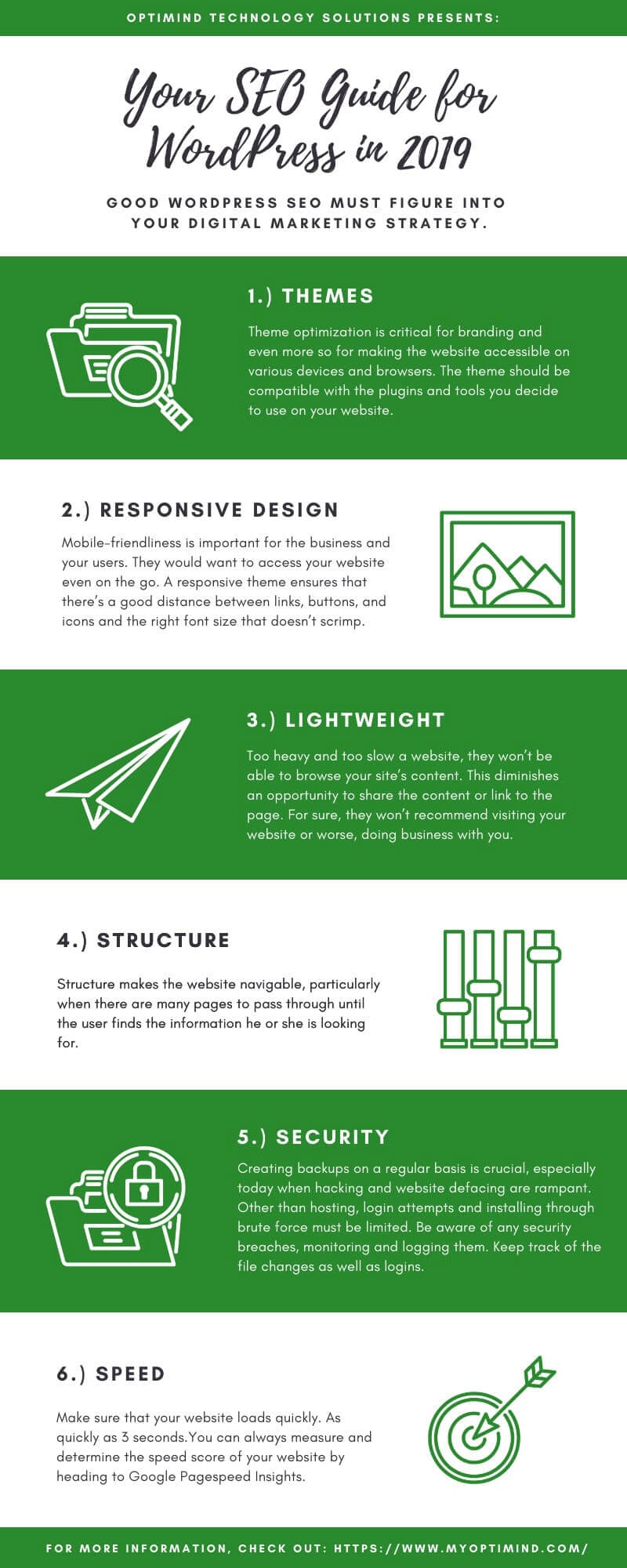
Themes
Theme optimization is critical for branding and even more so for ensuring the website is accessible across various devices and browsers.
In some cases, meta descriptions do not render or behave as they should. There are themes that automate descriptions. So always check your meta tags by previewing the website to ensure they are synchronized with the elements.
Do the same for the headings. Not all theme developers are SEO-savvy, putting two H1 tags when there should be only one.
While technically, the theme must, as much as possible, have a complete API, you may add or change any functionality through the theme.
Bottom line, the theme should be compatible with the plugins and tools you decide to use on your website.
Responsive design
Most WordPress themes today are responsive. Mobile-friendliness is important for the business and your users. They would want to access your website even on the go.
A responsive theme ensures that there’s a good distance between links, buttons, and icons, and that the font size isn’t too small.
These elements and more must adapt seamlessly to the screen size. This is addressable on CSS media queries.
When viewing the website on mobile devices, it should be clear to the users what tasks you want them to accomplish. For instance, you may emphasize the main task by using the largest call-to-action button on the page.
AMP
With WordPress, you have a choice to use AMP or accelerated mobile pages. AMP allows the pages to load faster. It can be used for both static and dynamic websites.
Code requirements are, however, too technical. You might as well let the experts do the AMP conversion of your website.
Lightweight
The WordPress site must have all the UX design elements, but not in a way that slows the website. A user will leave your website if it takes 3 seconds or more to load, especially when viewing on a mobile device.
A slow website is a risk that only frustrates the users. Don’t expect people to come to your website, stay to engage, convert, and then return in the future, because they won’t.
Too heavy and too slow a website, they won’t be able to browse your site’s content. This diminishes an opportunity to share the content or link to the page. For sure, they won’t recommend visiting your website or, worse, doing business with you.
As a rule of thumb, the entire website should be no more than 3 MB. To assess how heavy your website is, tools such as Google PageSpeed Insights and GTmetrix can help you identify what must be done to make it lighter.
Page speed optimization, which involves code and on-page elements, is a technical part of SEO for WordPress. So you can ask your in-house to do the optimization for you or tap the services of an SEO agency.
SSL certificate
Install a valid SSL certificate, as Google now indicates whether a site is secure or not if it doesn’t have one. The search engine also ensures that users see the warning.
Installing the certificate also adds a protective layer against hackers and third-party intruders.
Check for the latest versions of the theme you are using. Updating the theme alone can sometimes fix security errors.
Settings
From the dashboard, you may easily change the settings under the Reading and Writing section. Yoast also has specific sections to tweak these elements.
Permalink
A permalink is a portmanteau of “permanent” and “link,” or simply the URL of the page. The permalink structure can be changed in terms of components, order, and structure to better reflect the page’s content.
The simpler and shorter the permalink, the better. You want to go with a permalink structure that supports the SEO of the page and the website.
Speaking of which, it would be wise to pick the permalink structure during the initial setup of your website. Changing the structure later on may negatively impact SEO.
Comment
Leaving a comment is the type of interaction you’d want on your website. So make sure you allow comments, pings, and trackbacks on your articles or blog posts.
Accessibility
All optimization efforts would be useless if bots cannot find and crawl your website. There are many technical issues affecting website accessibility.
Mobile-friendliness
The necessity of making your WordPress website mobile-friendly cannot be emphasized enough. Google closely monitors mobile-friendliness as a ranking signal in both web and mobile search.
When we say mobile-friendly, it means the website is viewable on various devices and browsers. It should render seamlessly, adapting to the screen and with the most important elements above the fold.
In Google’s lingo, this also refers to a mobile-friendly site with clickable or tappable buttons, links that are not too close together, readable font sizes, and images that are not oversized or heavy.
Sitemap.xml file
The sitemap.xml file tells the search engine spiders the existence of crawlable pages.
There are several tools you can use to generate a sitemap.xml file for your WordPress website. Yoast is one. Then, you can submit the updated website on Google Search Console.
Robots.txt file
Robots.txt provides directives to crawlers about which parts of the website they should crawl and index. It allows and disallows identifiers.
As such, you can block certain pages straight from the robots.txt file. This allows for a higher crawling rate, in which the bots can focus on the most important pages of the website rather than auxiliary, non-converting pages.
Google Analytics
Setting up and integrating Google Analytics is important for every website.
The tracking ID, which will be generated after creating an account, must be added to the website’s code, specifically in the header. If not there, the tag can be added to Google Tag Manager.
Google Search Console
Setting up Google Search Console (formerly Google Webmasters Tool) is the next step. Your website must be added as a property by adding the absolute URL and verifying the website.
From its dashboard, you will see data and insights into how your website is performing, and you can correct any errors.
Structure
The structure makes the website navigable, particularly when there are many pages to navigate before the user finds the information they are looking for.
Breadcrumbs
Configuring the website’s information structure may mean adding breadcrumbs. These are the links that allow visitors to navigate the website easily and help crawlers determine how the website is actually structured.
Breadcrumbs link to the homepage, category, and subcategory.
Schema markup
Schema markups are additional codes for better data serving to the visitors. These are important in SEO because they help in increasing the click-through rate (CTR).
Lots of WordPress themes are already schema-coded. If you are unsure, you may test your site with the Google Structured Data Testing Tool.
Security
Aside from installing an SSL certificate and migrating your website from HTTP to HTTPS, there are other security elements to consider.
Regular backups
Creating backups regularly is crucial, especially today, when hacking and website defacing are rampant. This is also useful when you add or update a plugin or update the theme.
Reverting changes should be second nature and is only possible with reliable backups.
Setup hardening
Hardening the setup means choosing the right hosting provider, which is part of your website’s overall security structure.
Other than hosting, login attempts and installing through brute force must be limited. It is like building a wall so your website won’t be targeted by malicious acts.
Monitor and log
Be aware of any security breaches and monitor and log them. Essentially, keep track of file changes and logins.
WordFence and WP Security Audit Log are WordPress plugins that may help you with this purpose. Act on any irregularity that you may discover.
Speed
To ensure users have the experience they deserve on your website, make sure it loads quickly. As quickly as 3 seconds.
You can always measure your website’s speed score by visiting Google Pagespeed Insights. This is just one tool, though, but be reminded that scores and results generally vary.
Speed things up. Period.
SEO for WordPress best practices
Content
Bill Gates once said: Content is king! And he is right, content is the differentiating SEO factor now. Here are the content-related best practices you should follow.
- A page must contain at least 300 words
- Strive for long-form content that is between 2,000 and more words as the ideal word count
Keyword
The secret of SEO for WordPress lies in writing quality, valuable, unique, and keyword-rich content and building quality backlinks to that page. Think of it this way: what looks spammy to you will also look spammy to Google. Here are some keyword-related best practices to know
- One keyword target per page only
- Put the main keyword in the URL of the page
- Put the main keyword in the title tag
- Put the main keyword in h1 or h2 tag
- Mention the main keyword between 3 and 10 times, depending on the number of words in the keyword phrase and length of the content.
- Strive for keyword variations (partial match) in the content body
- The ideal keyword count is 1 in every 100 words
- The ideal keyword density is from 2 to 4%, anything beyond that makes the page irrelevant
- Avoid keyword stuffing
Anchor text
Anchor text must be relevant to the external link
Meta tags
What are meta tags, you might ask. Meta tags refer to text snippets describing the content of the page. As content descriptors, they help Google determine what the page is about. These tags are not visible on the page itself but will be upon viewing the source code.
Meta tags make the page findable and crawlable by search engine bots. In essence, once the crawler establishes the contextuality of the page, it would be easier to rank it on search results pages.
There are four main types of meta tags: meta keywords, title tag, meta description, and meta robots. Headings are not an official meta tag but ‘taggable’ nonetheless. Below are the best practices for each.
Title
- Title must be relevant to the content of the page and 100% unique
- Put the target keyword in the title
- The title can be up to 12 words or 60 characters, but the keyword must be in the first 8 words
- Title must be up to 55 characters only or Google will truncate it
- Only include the keyword in the title if it is mentioned in the body content
Description
- Think of your meta description as an organic ad text
- Keep the description with 160 characters
Robots
Dofollow vs. nofollow
- Nofollow external sites especially those that aren’t trustworthy
Index vs. noindex
- Noindex ancillary pages such as terms and privacy policy, thank you pages, etc.
Heading
- Make the post title h1 and use the tag only once
- Put the keyword in either h1 or h2 tag
- Each heading must have more than 300 words between them
Links
Links are the backbone of SEO campaign success. However, there are several best practices to apply also.
Internal
- Use internal pages when linking out, not the homepage
- Limit the number of internal links per page to 2 to 10 links depending on the content length
External
- Limit the number of external links per page with 5 at most
- External links must be relevant to the page
- Deep-link (internal page to internal page linking) to relevant sites
Broken
- Remove all the broken links by deleting the page permanently or redirecting it to a related website
- Create a customized and searchable (if possible) error page message
Categories and tags
Categories and subcategories organize the website to add hierarchy and give it more structure. They also group content, particularly the broad topics.
As such, category and subcategory pages can be designated as the main landing pages of the website.
Tags, on the other hand, are non-hierarchical but can be used as page descriptors. This is important for the crawlers when assigning contextuality and relevance to a particular page, displaying it for relevant queries.
Images
Google, Yahoo!, and Bing cannot read images, only the alt tags and other textual elements attached to them (i.e. filename, title, and caption). The basic is not to overoptimize the at tags; overoptimization refers to stuffing keywords onto the tag.
Alt tags may not be seen by the users, so they cannot affect the UX. But Google sees these invisible elements and thus, penalizes sites that do over-optimization.
Below are image optimization best practices.
- Put the main keyword in the alt tag as naturally as possible
- Put the main keyword in just one image alt tag in a page
- Use descriptive texts to guide both the crawlers and the visitors
- Use ONLY relevant images
- Include a caption and put the keyword in the caption organically
- Compress the image to its right size to reduce page loading time
WordPress plugins and tools for SEO-friendly website
Several WordPress plugins and tools can make your website SEO-ready.
Yoast
Yoast is the #1 SEO plugin for WordPress. The best thing about this plugin aside from the constant update is the customizability of the features. There’s comprehensive documentation on how to use the plugin also.
Yoast provides actionable SEO opportunities to make your WordPress website perform better on the search engine results page.
Ryte
Ryte is also an all-in-one SEO tool, although it is most useful for on-page SEO. The tool crawls the website to look for opportunities to correct errors and improve indexation, speed, linkability, etc.
The tool is Yoast-integratable also so you don’t have to worry about incompatibility issues.
Google Lighthouse
Google Lighthouse is an extension that is free of charge. The Chrome extension generates a report including the performance, best practices, progressive web app, accessibility, and SEO scores.
The Lighthouse tool, therefore, provides an overview of the overall health of the website. Since you can immediately see which needs tweaking, you may work on them in an instant.
W3 Total Cache
W3 Total Cache is a feature-rich plugin whose main role is caching. It caches the page, browser, object, and database. The plugin also supports minification to make the page lighter.
Smush Image Compression and Optimisation
Smush compresses all images on your WordPress website – those that you’ve uploaded before and soon to upload.
Optimizing the images without losing quality. This is all the more important this year that visual search is a trend that is gaining traction.